Short answer: a bug is ready for a developer when the report holds the evidence needed to see the failure again without asking you anything: a specific title, a known starting state, numbered steps, expected versus actual result, the environment, how often it happens, and the one or two pieces of proof that match the failure (a screenshot or recording, the console log, a network capture). Strip secrets before you share any of it. This checklist shows what to capture, for which kind of bug, and what to remove.
Most bugs are not slow to fix because the fix is hard. They are slow because the report is thin. "Checkout not working" starts a chain of questions: which browser, which account, which page, every time or just once, any error message? Each round trip costs hours when the people involved sit in different time zones. QA Wolf's guide to bug reports puts the goal plainly: a good report holds the context needed to reproduce, diagnose and fix a defect without extra investigation. Atlassian's bug report template lists the same core fields: severity, environment, steps to reproduce, and expected versus actual results.
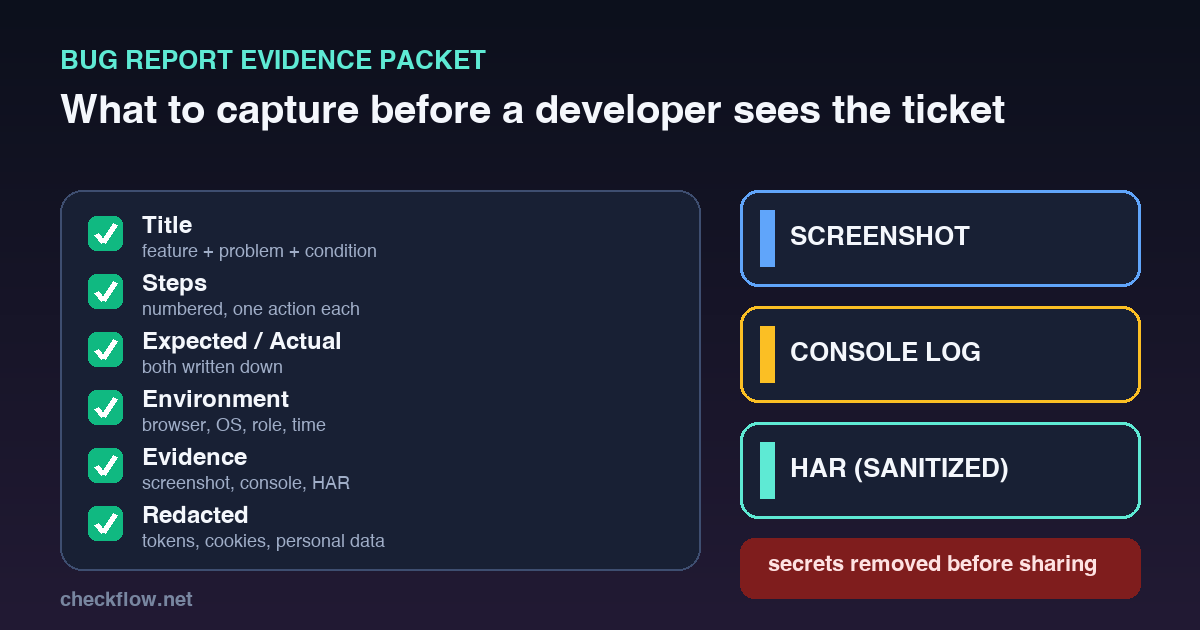
1. Write a title that survives a queue
A developer scans a list of tickets before opening any of them. Use three parts: the feature, the problem and the condition.
- Weak: "Payment issue".
- Better: "Checkout: Pay Now button stays disabled after the coupon is removed".
- Weak: "Login broken".
- Better: "Login: password reset link shows expired-token page on first click".
2. Name the starting state
Two people can follow the same steps and get different results because they began from different places. State the starting point: logged out, logged in as an admin, a new customer account, an empty cart, a cart with one yearly plan, mobile Safari, desktop Chrome with a clean profile, staging or production. If you test in a separate Chrome profile, say so, because extensions and saved sessions can change what a page does.
3. Number the steps, one action each
Steps should read like a recipe, not a story:
- Open
/pricing. - Select the Business plan.
- Apply coupon
LAUNCH20. - Remove the coupon.
- Click Pay Now.
"Try buying a plan with a coupon" hides the trigger. If one step contains five actions, nobody can tell which of them breaks the page. QA Wolf also recommends starting from a known state and listing exact UI elements and values.
4. Always write expected and actual
This pair is the heart of the report. Expected: after the coupon is removed, Pay Now stays enabled and shows the original price. Actual: Pay Now stays disabled until the page is refreshed. Without the expected result, a developer cannot judge whether the behaviour is a defect, a design choice or a misunderstanding.
5. Capture the environment
Record the URL, the environment (local, staging, preview or production), the browser and version, the operating system and device, the screen size for visual bugs, the user role, the plan, any feature flag or experiment, and the time of the test. For mobile, add the device model and OS version. For account-specific bugs, name the role and permission level. Never paste a password or token to describe an account.
6. Attach evidence that matches the failure
Attaching everything is as unhelpful as attaching nothing. Pick the proof for the bug type:
- Visual bug: a screenshot or short recording, plus the viewport size and a reference of the intended design if you have one.
- JavaScript error or dead button: the console output, the exact error text and the steps that trigger it.
- Failed request, payment or loading problem: a network capture, the failing request URL, the status code and the response message.
- Slow page: the URL, device, network condition and what you expected instead.
- Form bug: the values you entered (with private data replaced), the validation message and a screenshot.
Chrome's documentation covers the two most requested files. The Console's context menu has a "Save as..." option that writes the current messages to a plain-text .log file, and the same page notes that the Console clears on every page load unless you turn on Preserve Log, which matters for bugs that happen during a redirect or form submit. The Network panel can save all requests to a HAR file. HAR (HTTP Archive) is a JSON format that many HTTP tools can open, including Google's HAR Analyzer.
7. Redact before you share
Evidence often carries secrets. Before a screenshot, recording, log or HAR file leaves your hands, remove passwords, tokens, cookies, session IDs, authorization headers, API keys, customer names you do not need, phone numbers, email addresses, billing details, full addresses and private message text.
HAR files deserve extra care because they record requests and responses. Chrome's current behaviour helps: by default DevTools exports a "sanitized" HAR that leaves out sensitive data such as Cookie, Set-Cookie and Authorization headers, while a separate "with sensitive data" option exists and must be enabled in settings first. Choose the sanitized export unless an engineer asks for the full one, and even then read the file before sending it. Sanitizing headers does not clean the request body, so a form post can still contain a name or an email address.
8. Separate severity from priority
Severity is the impact: a blocker makes a core flow unusable; critical covers money, login, security or customer-data risk; high is a major feature broken; medium has a workaround; low is cosmetic. Priority is the timing: now, today, this sprint or backlog. A typo on the home page may be top priority during launch week but low severity. A rare checkout failure can be high severity even when few people hit it. Writing both stops arguments later.
9. Say how often and who is affected
"Always", "often", "sometimes" and "once" are four different bugs. Add how many people or which segment it touches (all mobile users, only annual plans, only one browser). A bug seen once with no steps may need more observation before it becomes a ticket. A bug seen by every visitor on the pricing page needs to go to the top of the pile.
A copy-paste bug report template
- Summary: feature + problem + condition.
- Environment: URL, environment, browser and version, OS, device, role, time.
- Steps to reproduce: numbered, one action per step, from a stated starting state.
- Expected result: what should happen.
- Actual result: what happened instead.
- Frequency and impact: how often, and who is affected.
- Evidence: screenshot or recording, console log, HAR or request details.
- Redaction done: yes, with a note of what was removed.
- Severity and priority: set separately.
- Retest note: what to check after the fix.
Readiness checklist before you assign it
- The title names the feature, the problem and the condition.
- The starting state and environment are written down.
- Steps are numbered, and a second person could follow them.
- Expected and actual results are both present.
- Frequency is marked.
- Evidence matches the bug type (visual, script, network or form).
- Secrets and personal data are removed from every attachment.
- You searched the tracker for a duplicate.
- Severity and priority are set separately.
- The retest path is clear.
Where this fits in launch QA
A good evidence packet matters most in the days around a release, when many testers report quickly and engineers have little time. Agree the template once, keep it in your tracker, and ask for it on every report during launch week. If you are preparing a launch, our website launch smoke test checklist shows what to test, the free interactive launch checklist lets you tick checks off and copy a report, and the lead form tracking QA checklist covers a common source of silent failures. The tracker itself can be Jira, Linear, GitHub Issues or a shared sheet; what matters is that every report arrives complete.
FAQ
What should a bug report include?
A specific title, the starting state, numbered steps, expected and actual results, the environment, how often it happens, who is affected, matching evidence, a note that sensitive data was removed, and a retest note.
Does every bug need a HAR file?
No. A HAR file helps with failed requests, payments and loading problems. A purely visual bug usually needs only a screenshot or recording and the viewport size.
Should I attach console logs?
Yes when a button does nothing, a script error appears or a request fails. Turn on Preserve Log first if the problem happens during a page load or redirect.
Is a sanitized HAR file always safe to share?
Not automatically. Chrome's sanitized export leaves out Cookie, Set-Cookie and Authorization headers, but request bodies and URLs can still hold personal data. Review the file before you send it.
What is the difference between severity and priority?
Severity measures impact on users or the business. Priority decides when the team will fix it. They often match, but not always.